altwork Try on WhatsApp
Campaigns Available

WhatsApp campaigns that get replies.

Promotions, new arrivals, follow-ups: compose a message with image, video and buttons, send it to customers who opted in, and let your AI agents handle the replies.

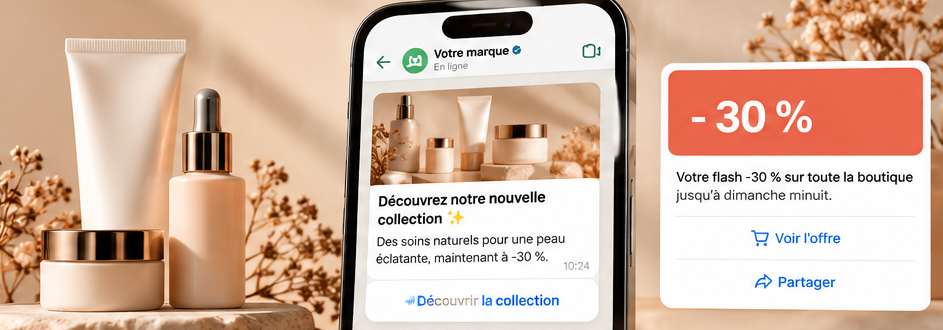
Preview of a WhatsApp campaign with an image and a button

What is a WhatsApp campaign?.

A message sent to your contacts, right in WhatsApp — where they already read their messages. It can include a visual and buttons that open an offer, a WhatsApp App or start a scenario.

01A useful messageAn offer, a new arrival, an invitation: one clear goal.
02The right recipientsOnly contacts who agreed to receive your messages.
03A conversationEvery reply lands in your Inbox; your AI agents can answer.

Start from a template.

Illustrative examples

Templates by goal and industry, fully editable. These show what you can send.

-30 %
Flash sale: 30% off the whole store, until Sunday.
↗ See the offer
↩ Not interested
GoalPromotion
ExampleUse →
New
The autumn collection has landed. Our three favourite pieces 👇
↗ Discover
GoalLaunch
ExampleUse →
-15 %
It’s been a while! 15% off your next visit with code BACK15.
↗ Book
↩ Later
GoalReactivation
ExampleUse →
Thursday 7 pm
Thursday evening tasting: 5 food and wine pairings. Limited seats.
↩ Book my seat
GoalInvitation
ExampleUse →
T3 · 68 m²
A bright two-bedroom flat just came up in your area. Would you like to visit?
☰ Book a viewing
GoalAcquisition
ExampleUse →
Our winter hours change from 1 November: Tuesday to Saturday, 10 am–7 pm.
GoalInformation
ExampleUse →

Campaign Studio, in six steps.

A guided flow, with the WhatsApp preview always visible. Click a step.

ALAtelier Lumen
Goal · Promotion
Template · 48-hour flash sale
-30 %
Hi Camille 👋 Flash sale: 30% off the whole store, until Sunday.
↗ See the offer
↩ Not interested
Audience · opted-in contacts only
Scheduled · tomorrow 10:00
✓ All set · ready to launch

Message formats.

AaText
▣Image
▶Video
▤Document
↗Buttons
◫Carousel
◈Products

Respectful sending, by default.

ConsentContacts without consent are excluded automatically.
Opt-outA “STOP” line suggested in every campaign.
Paced sendingTo protect your number’s quality.
Approved templatesOutside the 24-hour window, WhatsApp requires a Meta-approved template: Altwork guides you.

And after sending?.

CAMPAIGNThe customer repliesOr taps a button in the message.
INBOXThe conversation arrivesIn your Inbox, with the contact’s history.
SCENARIONext steps run automaticallyAn AI agent replies, qualifies or opens a WhatsApp App.
ACTIVITYThe resultsReplies, meetings and sales, tracked in Altwork.

Included in your Altwork plan.

No separate subscription: campaigns, scenarios and WhatsApp Apps all come with the same plan.

Launch · €99 excl. VAT/month500 campaign messages included
Growth · €199 excl. VAT/month1,000 campaign messages included
See pricing

Estimate a campaign’s cost.

Enter the number of messages to send. The estimate accounts for the messages included in your plan.

Plan
messages
010,00020,000
Cost of this campaign
647 €excl. VAT · one-off purchase
Launch subscription · monthly€99 excl. VAT / month
Included messages / month500
Extra messages4,500
Marketing packs2 × 1 000 + 1 × 2 500 = 647 €
One-off purchase, never automatic: your subscription doesn’t change.
Marketing top-ups · one-time purchase500 messages: €79 excluding tax · 1,000: €149 · 2,500: €349. Each pack is valid for 12 months from activation after payment. An active Launch or Growth subscription and an official WhatsApp Business channel are required to use these credits. If your subscription expires, credits are retained until their own expiry date; reactivate your subscription to use them again. A pack does not extend your subscription. Estimate excluding tax, assuming the full monthly allowance is available. Existing purchased credits are not deducted. The final amount is confirmed before payment.

Frequently asked questions.

Who can I send a campaign to?

Only contacts who agreed to receive your messages. Others are excluded automatically when you choose the audience.

How are messages counted?

Each message sent to a recipient counts as one message. Your customers’ replies don’t reduce your quota.

Can I schedule a send?

Yes, at the date and time of your choice, with the time zone shown. You can cancel until it goes out.

Do I need a Meta-approved template?

To write to a contact outside the 24-hour window after their last message, yes. Altwork lets you submit a new template or use one that is already approved.

Can I import my contacts?

Yes, by CSV file or from an integration available on your account. Consent is still required.

What happens when a customer replies?

The conversation lands in your Inbox. A scenario or an AI agent can take over, and you can step in at any time.

Explore your WhatsApp journey.

Prepare acquisition, automation and follow-ups with our guides:

Click-to-WhatsApp: From Click to Conversation
WhatsApp Abandoned Cart Recovery
WhatsApp AI Agent
WhatsApp Business Automation
ScenariosAutomate what happens when a customer replies.
→
WhatsApp AppsAdd a form to your campaign’s button.
→

Launch your first WhatsApp campaign.

Launch my first campaignTry on WhatsApp