altwork Try on WhatsApp
WhatsApp Apps Early access

Turn your conversations into interactive experiences.

Forms, questionnaires, booking requests and personalised flows: collect the right information at the right time, with no development.

WhatsApp Apps are in early access: the button opens an access request.

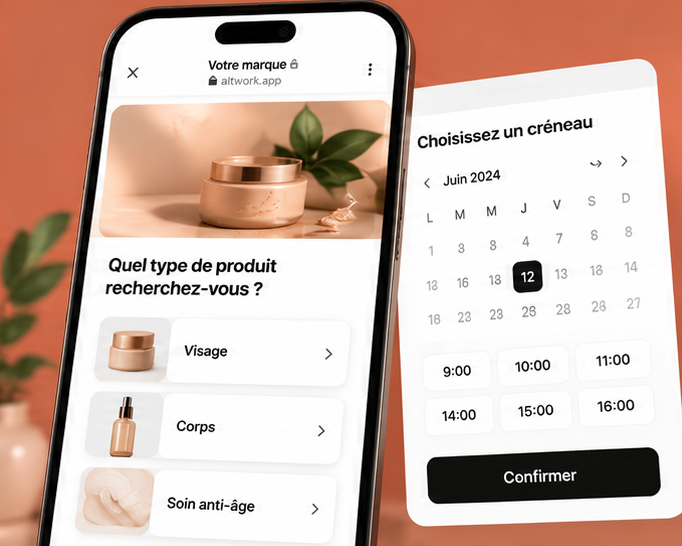
Preview of a WhatsApp App: picking a product and a time slot

What is a WhatsApp App?.

A structured experience, opened from a conversation, that lets the customer provide information or take an action. Answers come back organised, field by field.

01A conversationThe customer writes, or taps a campaign button.
02The app opensA few short screens: choices, time slot, description, photos.
03Clear answersEach piece of information lands in the right field, with no retyping.

Four examples to explore.

Illustrative examples
01

Qualification form

Collect the project, budget and timeline before replying. Answers arrive structured, ready to qualify.

  • FieldsSingle choice, number, short text
  • Ideal forReal estate, services, B2B
  • ThenThe scenario decides what’s next
✕harbour.altwork.app⋯
Your project
Buy
Rent
< 300 k€
300–500 k€
E.g. Lisbon
Continue
02

Booking request

The customer picks a service and a time slot from the ones you offer, then confirms.

  • FieldsChoice, time slot, phone
  • Ideal forBeauty, health, consulting
  • ThenConfirmation and reminder
✕nova.altwork.app⋯
Pick a time slot
10:00
11:30
14:30
16:00
Gel manicure · 45 min
Confirm
03

Quote request

Description, photos and address: everything you need to price the job, without back-and-forth.

  • FieldsLong text, photo, address
  • Ideal forTrades, renovation, events
  • ThenSent to your team
✕atelierbati.altwork.app⋯
Describe your project
Bathroom
Replace the bathtub with a shower…
📷 Add photos
Send request
04

Product selection

A mini catalogue to pick items and options, before ordering or being contacted.

  • FieldsProducts, quantity, options
  • Ideal forE-commerce, restaurants
  • ThenCart or request sent
✕lumen.altwork.app⋯
New arrivals
Linen tote79 €
Ceramic bowl24 €
Wool throw119 €
View my selection (1)

Build in a few steps.

01ChooseA template by use case and industry, or a blank app.
02ComposeAdd fields and organise the screens.
03CustomiseText, options, logo and colours.
04TestPreview on mobile and try it yourself.
05PublishThrough a sharing mode available on your account.

How do you share a WhatsApp App?.

The same app can be shared in several ways. Available modes depend on your account and evolve with the product.

WEB
Hosted web link

A button or link opens the app in WhatsApp’s browser. Every field type, your logo and your colours.

Ideal for: detailed quotes, catalogues, photos.
CHAT
Guided WhatsApp conversation

The agent asks the questions one by one in the conversation, with reply buttons. Nothing to open.

Ideal for: short qualification, first contact.
FLOW
Native WhatsApp Flows

A native form opens on top of the conversation, when your WhatsApp Business account supports it.

Ideal for: bookings, short sign-ups.

What happens to the answers?.

WHATSAPP APPThe customer submitsTheir answers, field by field.
DATAAnswers savedLinked to the conversation and the contact.
CONTACTContact updatedIn Altwork, and in your CRM when the integration is available.
NEXTScenario or AI agentThat confirms, qualifies or hands over to your team.

Syncing to external tools depends on the integrations active on your account. See integrations.

Included in your Altwork plan.

No separate subscription: campaigns, scenarios and WhatsApp Apps all come with the same plan.

Launch · €99 excl. VAT/month500 campaign messages included
Growth · €199 excl. VAT/month1,000 campaign messages included
See pricing

Frequently asked questions.

Do I need to code?

No. A WhatsApp App is made of screens and fields that you add and rearrange in a visual editor.

Which field types can I use?

Text, single or multiple choice, number, date or time slot, phone, email, consent, and depending on the sharing mode, photos or products.

Where are the answers stored?

In Altwork, linked to the contact and the conversation. Sending to other tools depends on the integrations available on your account.

How do I publish an app?

You choose a sharing mode available on your account: web link, guided conversation or, where supported, native WhatsApp Flows.

Can I use it in a campaign or a scenario?

Yes, that’s its main use: a campaign button or a scenario step opens the app at the right moment.

How much does it cost?

WhatsApp Apps come with your Altwork plan, with no separate subscription. Messages sent by Altwork to share the app are counted like any others.

Are there WhatsApp limitations?

Yes: outside the 24-hour window after the customer’s last message, only a Meta-approved message template can be sent. Native Flows also depend on your WhatsApp Business account.
ScenariosDecide what happens once the app is completed.
→
CampaignsOpen the app from a campaign button.
→

Create your first interactive experience.

Create my first WhatsApp AppTry on WhatsApp